Arc Identification#
Meshwell can automatically identify sequences of vertices that form circular arcs. This reduces the complexity of the CAD model and improves mesh quality.
import matplotlib.pyplot as plt
import numpy as np
import shapely

from meshwell.cad_common import apply_arc_params
from meshwell.cad_occ import cad_occ
from meshwell.circle_registry import build_circle_registry
from meshwell.mesh import mesh
from meshwell.occ_xao_writer import write_xao
from meshwell.polyline import PolyLine
from meshwell.polysurface import PolySurface
/home/runner/work/meshwell/meshwell/.venv/lib/python3.13/site-packages/tqdm/auto.py:21: TqdmWarning: IProgress not found. Please update jupyter and ipywidgets. See https://ipywidgets.readthedocs.io/en/stable/user_install.html
  from .autonotebook import tqdm as notebook_tqdm
# Create a circular geometry with many points
theta = np.linspace(0, np.pi / 2, 50)
vertices = [(np.cos(t), np.sin(t)) for t in theta]
vertices += [(0, 1), (0, 0), (1, 0)]
poly = shapely.Polygon(vertices)
PolySurface with Arc Identification#
identify_arcs is now a pipeline-level setting (it must agree across
any entities sharing a circular boundary), stamped onto entities via
apply_arc_params rather than passed to the constructor. We enable it
here to recover the true curved boundary.
ps = PolySurface(
    poly,
    physical_name="curved_surface",
)
apply_arc_params([ps], identify_arcs=True, min_arc_points=4, arc_tolerance=1e-3)
Visualize Decomposition#
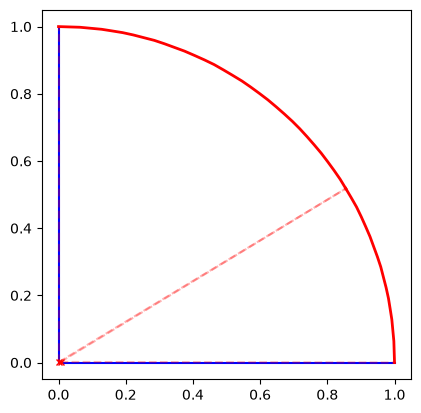
We can inspect how the polygon was partitioned into lines and arcs. Blue lines are straight segments, red lines are identified arcs.
ax = ps.plot_decomposition()
plt.show()
Global (cross-entity) arc fitting#
Arc detection happens per ring, but the fitted circles are no longer
used directly (“local” fitting). Two entities sharing a circular
boundary discretize it independently, so their locally-fitted circles
can disagree by up to arc_tolerance — far more than any boolean
clearance, producing graze/gap slivers at the shared interface.
Instead, the OCC pipeline fits arcs on every entity’s nominal (unbuffered) rings, clusters the fits across all entities, and assigns each cluster one canonical circle (a weighted average of its member fits). Every arc in the scene is then emitted on its canonical circle, so both sides of a shared circular boundary produce the identical curve. Perturbation offsets are applied analytically to the canonical radius (R ± perturbation) at wire-emission time, never by re-buffering and re-fitting.
We can see the registry in action: a disk and a plate with a matching circular hole each fit the boundary on their own discretization, but the fits cluster into a single canonical circle.
theta_full = np.linspace(0, 2 * np.pi, 100, endpoint=False)
circle_pts = [(np.cos(t), np.sin(t)) for t in theta_full]

disk = PolySurface(shapely.Polygon(circle_pts), physical_name="disk")
plate = PolySurface(
    shapely.box(-2, -2, 2, 2).difference(shapely.Polygon(circle_pts)),
    physical_name="plate",
)
apply_arc_params([disk, plate], identify_arcs=True)

registry = build_circle_registry([disk, plate])
for cluster in registry.clusters:
    print(f"canonical circle: center={cluster.center}, radius={cluster.radius:.6f}")
canonical circle: center=(8.209028061352329e-07, 0.0), radius=1.000042
Both entities’ boundary arcs resolve to this one circle, so the
disk/plate interface is exactly conformal in the CAD. This all happens
automatically inside the pipeline — the registry is built and stamped
onto entities by cad_occ; you only opt in via apply_arc_params
(or identify_arcs=True in generate_mesh).
PolyLine with Arc Identification#
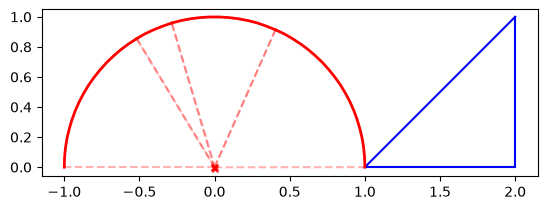
# Create a wavy line that contains an arc
t = np.linspace(0, np.pi, 50)
arc_vertices = [(np.cos(t_val), np.sin(t_val)) for t_val in t]
line_vertices = [(1, 0), (2, 0), (2, 1)]
all_vertices = line_vertices + arc_vertices

pl = PolyLine(shapely.LineString(all_vertices), physical_name="curved_wire")
apply_arc_params([pl], identify_arcs=True)
ax = pl.plot_decomposition()
plt.show()
Meshing Results#
Generate the mesh. Notice how the arcs are preserved in the underlying CAD.
write_xao(cad_occ([ps]), "arc_example.xao")
output_mesh = mesh(
    dim=2,
    input_file="arc_example.xao",
    output_file="arc_example.msh",
    default_characteristic_length=0.1,
    mesh_element_order=2,
)
Info    : Clearing all models and views...
Info    : Done clearing all models and views
Info    : Reading 'arc_example.xao'...
Info    : Done reading 'arc_example.xao'