Structured sweeps#
Notebook 23 covers 3D wedge meshing: a PolyPrism with
structured=True is filled with axis-aligned prism layers instead of tets.
Structured sweeps are the 2D sibling, aimed at a different problem:
admissible anisotropic bands for transport-style solvers (e.g. drift-diffusion
on Voronoi finite volumes), where a thin layer along a shared interface (a
quantum well, a doped junction) needs a controlled tensor grid of right
triangles at a large aspect ratio, while everything outside the band stays a
normal unstructured triangle mesh. A StructuredSweep declares which
interface/boundary/embedded curve to grow the band from and how thick it is
on each side; a StructuredSweepResolutionSpec (keyed by the sweep’s name in
resolution_specs, exactly like any other resolution spec) supplies the
tangential and normal grids.
A worked example: a two-layer stack#
Two stacked boxes, lower and upper, meet along y=1. We grow a
"qw" sweep of thickness 0.4 into upper from that shared interface
(named lower___upper by meshwell’s interface convention), and mesh it as
a 2-layer tensor grid with tangential spacing 1.0.
import shapely

from meshwell.orchestrator import generate_mesh
from meshwell.polysurface import PolySurface
from meshwell.resolution import Graded, StructuredSweepResolutionSpec
from meshwell.structured.sweep import StructuredSweep
from meshwell.visualization import plot2D

lower = PolySurface(
    polygons=shapely.box(0, 0, 4, 1), physical_name="lower", mesh_order=2
)
upper = PolySurface(
    polygons=shapely.box(0, 1, 4, 2), physical_name="upper", mesh_order=1
)

qw_sweep = StructuredSweep(name="qw", on="lower___upper", thickness={"upper": 0.4})

mesh_obj = generate_mesh(
    entities=[lower, upper],
    sweeps=[qw_sweep],
    dim=2,
    output_mesh="structured_sweep.msh",
    default_characteristic_length=0.5,
    resolution_specs={
        "qw": [
            StructuredSweepResolutionSpec(
                tangential=1.0, normal={"upper": 2}, element_type="triangle"
            )
        ],
    },
)
/home/runner/work/meshwell/meshwell/.venv/lib/python3.13/site-packages/tqdm/auto.py:21: TqdmWarning: IProgress not found. Please update jupyter and ipywidgets. See https://ipywidgets.readthedocs.io/en/stable/user_install.html
  from .autonotebook import tqdm as notebook_tqdm
Info    : Clearing all models and views...
Info    : Done clearing all models and views
Info    : Reading '/tmp/tmpm2q0dq6w/cad.xao'...
Info    : Done reading '/tmp/tmpm2q0dq6w/cad.xao'
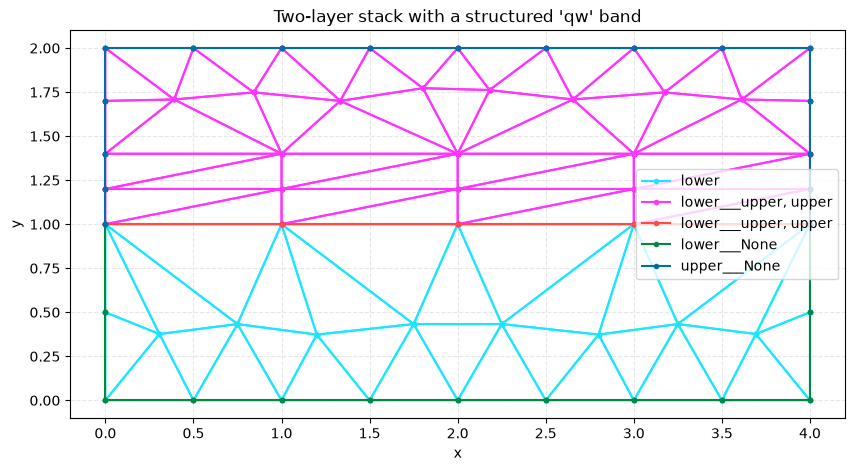
The band (four tangential cells x two normal layers, each split into a
right-triangle pair) is an exact tensor grid, conformal with the
unstructured fill outside it; lower___upper still appears as an
interface physical group.
tris = sum(cb.data.shape[0] for cb in mesh_obj.cells if cb.type == "triangle")
print(f"triangles: {tris}")
print("interface groups:", [k for k in mesh_obj.cell_sets if "___" in k])
triangles: 76
interface groups: ['lower___upper', 'lower___None', 'upper___None']
plot2D(mesh_obj, title="Two-layer stack with a structured 'qw' band", wireframe=True)
Specifying the normal grid: int, explicit array, or Graded#
StructuredSweepResolutionSpec.normal is a dict from side name to one of:
int: that many uniform layers spanning the thickness (used above).explicit
list[float]: offsets from 0.0 to the sweep thickness; useful when specific coordinates (e.g. a ridge corner) must land on the grid exactly.Graded(h0, ratio): geometric grading starting at cell sizeh0, growing byratioeach cell, with the final cell adjusted to land exactly on the thickness – no need to restate the thickness redundantly.
The same knobs exist independently per side, so a two-sided sweep (grown
from an embedded PolyLine, both sides at once) can grade differently
left vs. right.
bulk = PolySurface(polygons=shapely.box(0, 0, 4, 2), physical_name="bulk", mesh_order=1)
from meshwell.polyline import PolyLine  # noqa: E402

junction = PolyLine(
    linestrings=shapely.LineString([(0.0, 1.0), (4.0, 1.0)]), physical_name="jn"
)

graded_sweep = StructuredSweep(name="j", on="jn", thickness={"left": 0.4, "right": 0.2})

graded_mesh = generate_mesh(
    entities=[bulk, junction],
    sweeps=[graded_sweep],
    dim=2,
    output_mesh="structured_sweep_graded.msh",
    default_characteristic_length=0.5,
    resolution_specs={
        "j": [
            StructuredSweepResolutionSpec(
                tangential=1.0,
                normal={"left": Graded(h0=0.05, ratio=2.0), "right": 2},
            )
        ],
    },
)
ys = sorted({round(y, 9) for y in graded_mesh.points[:, 1]})
print("y coordinates near the junction:", [y for y in ys if 0.7 <= y <= 1.3])
Info    : Clearing all models and views...
Info    : Done clearing all models and views
Info    : Reading '/tmp/tmprlupivtj/cad.xao'...
Info    : Done reading '/tmp/tmprlupivtj/cad.xao'
y coordinates near the junction: [np.float64(0.8), np.float64(0.9), np.float64(1.0), np.float64(1.05), np.float64(1.15)]
Quad output#
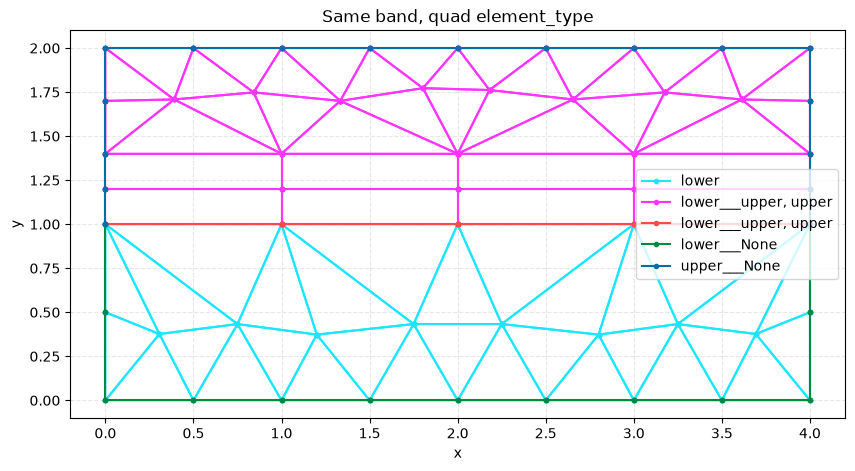
element_type="quad" skips the diagonal split and emits the tensor grid
directly as quadrilaterals (2D only; the default "triangle" remains the
right choice for downstream simplex-only solvers).
quad_mesh = generate_mesh(
    entities=[lower, upper],
    sweeps=[qw_sweep],
    dim=2,
    output_mesh="structured_sweep_quad.msh",
    default_characteristic_length=0.5,
    resolution_specs={
        "qw": [
            StructuredSweepResolutionSpec(
                tangential=1.0, normal={"upper": 2}, element_type="quad"
            )
        ],
    },
)
quads = sum(cb.data.shape[0] for cb in quad_mesh.cells if cb.type == "quad")
print(f"quads: {quads}")  # 4 tangential cells x 2 normal layers
Info    : Clearing all models and views...
Info    : Done clearing all models and views
Info    : Reading '/tmp/tmp7003m05s/cad.xao'...
Info    : Done reading '/tmp/tmp7003m05s/cad.xao'
quads: 8
plot2D(quad_mesh, title="Same band, quad element_type", wireframe=True)
CAD and meshing as separate steps#
generate_mesh(..., checkpoint_cad=...) writes the fragmented,
sweep-tagged CAD to an .xao file without meshing it. A later, independent
call to mesh(input_file=..., resolution_specs=...) reproduces the same
result – useful when the CAD stage is expensive and several mesh
resolutions are tried against the same geometry.
from pathlib import Path  # noqa: E402

from meshwell.mesh import mesh  # noqa: E402

cad_checkpoint = Path("structured_sweep.xao")
specs = {"qw": [StructuredSweepResolutionSpec(tangential=1.0, normal={"upper": 2})]}

one_step = generate_mesh(
    entities=[lower, upper],
    sweeps=[qw_sweep],
    dim=2,
    checkpoint_cad=cad_checkpoint,
    output_mesh="structured_sweep_onestep.msh",
    default_characteristic_length=0.5,
    resolution_specs=specs,
)
two_step = mesh(
    dim=2,
    input_file=cad_checkpoint,
    output_file="structured_sweep_twostep.msh",
    default_characteristic_length=0.5,
    resolution_specs=specs,
)

import numpy as np  # noqa: E402

band = lambda m: np.unique(  # noqa: E731
    np.round(
        m.points[(m.points[:, 1] >= 1 - 1e-9) & (m.points[:, 1] <= 1.4 + 1e-9), :2], 9
    ),
    axis=0,
)
np.testing.assert_array_equal(band(one_step), band(two_step))
print("separate CAD -> mesh steps reproduce the one-shot result exactly")
Info    : Clearing all models and views...
Info    : Done clearing all models and views
Info    : Reading '/tmp/tmpm91npdi9/cad.xao'...
Info    : Done reading '/tmp/tmpm91npdi9/cad.xao'
Info    : Writing 'structured_sweep.xao'...
Info    : Done writing 'structured_sweep.xao'
Info    : Clearing all models and views...
Info    : Done clearing all models and views
Info    : Reading 'structured_sweep.xao'...
Info    : Done reading 'structured_sweep.xao'
separate CAD -> mesh steps reproduce the one-shot result exactly
Errors you will meet#
SweepPairingError– aStructuredSweephas no matchingStructuredSweepResolutionSpecunder its name inresolution_specs, or vice versa; sweep declarations and resolution specs must pair 1:1.SweepSplitCoordinateError– BOP split a sweep’s boundary edge (e.g. a ridge sitting on top of the band) at a coordinate that isn’t in the explicittangentialarray; add that coordinate to the array.SweepCurvedSourceError– the sweep’sonattachment resolved to a curved or multi-segment boundary; phase 1 only supports straight sources (attach to a straight embeddedPolyLinesubset instead).