Targeting resolutions#
ResolutionSpecs have many attributes that allow them to be targeted.
import shapely

from meshwell.cad_occ import cad_occ
from meshwell.mesh import mesh
from meshwell.occ_xao_writer import write_xao
from meshwell.polysurface import PolySurface
from meshwell.resolution import ConstantInField, ThresholdField
from meshwell.visualization import plot2D
/home/runner/work/meshwell/meshwell/.venv/lib/python3.13/site-packages/tqdm/auto.py:21: TqdmWarning: IProgress not found. Please update jupyter and ipywidgets. See https://ipywidgets.readthedocs.io/en/stable/user_install.html
  from .autonotebook import tqdm as notebook_tqdm
Filtering by mass#
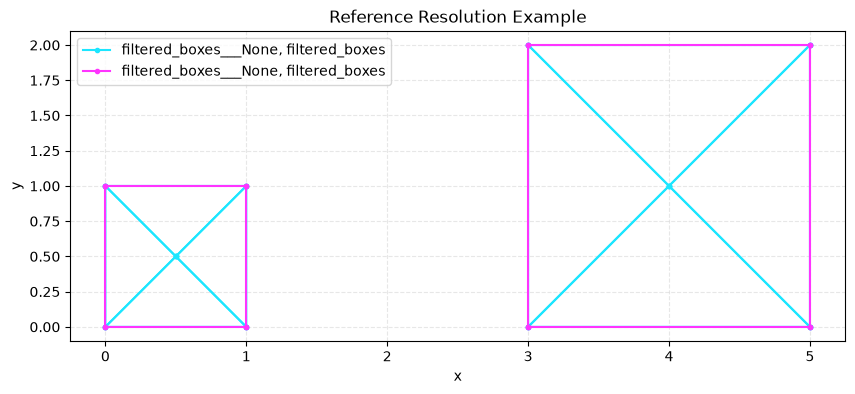
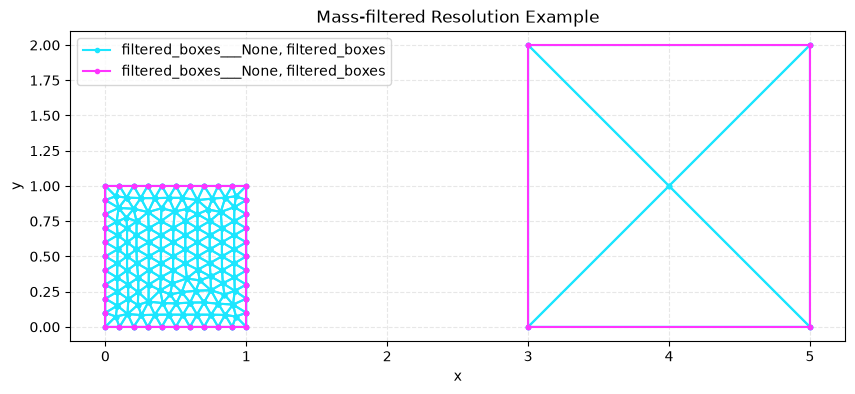
ResolutionSpecs can be selectively applied given the “mass” of the entity (total lengths of curves, total area of surfaces, total volumes of volumes).
# Create two boxes of different sizes
small_box = shapely.box(0, 0, 1, 1)
large_box = shapely.box(3, 0, 5, 2)

# Combine into multipolygon
multi = shapely.MultiPolygon([small_box, large_box])

# Create polysurface with filtered resolution specs
polysurface = PolySurface(
    polygons=multi,
    physical_name="filtered_boxes",
)

write_xao(cad_occ([polysurface]), "filtering_model.xao")

output_mesh = mesh(
    dim=2,
    input_file="filtering_model.xao",
    output_file="mass_unfiltered.msh",
    default_characteristic_length=2,
)

plot2D(output_mesh, wireframe=True, title="Reference Resolution Example")

output_mesh = mesh(
    dim=2,
    input_file="filtering_model.xao",
    output_file="mass_filtered.msh",
    default_characteristic_length=2,
    resolution_specs={
        "filtered_boxes": [
            # Fine resolution for small curves
            ConstantInField(
                resolution=0.1,
                apply_to="surfaces",
                max_mass=4,  # Only applies to curves with perimeter < 4
            ),
        ],
    },
)


plot2D(output_mesh, wireframe=True, title="Mass-filtered Resolution Example")
Info    : Clearing all models and views...
Info    : Done clearing all models and views
Info    : Reading 'filtering_model.xao'...
Info    : Done reading 'filtering_model.xao'
Info    : Clearing all models and views...
Info    : Done clearing all models and views
Info    : Reading 'filtering_model.xao'...
Info    : Done reading 'filtering_model.xao'
Filtering the application by sharing/not sharing#
For surfaces/curves/points, the ResolutionSpec can be applied if the entity is touching (or not touching) another entity.
Restricting the evaluation of the field#
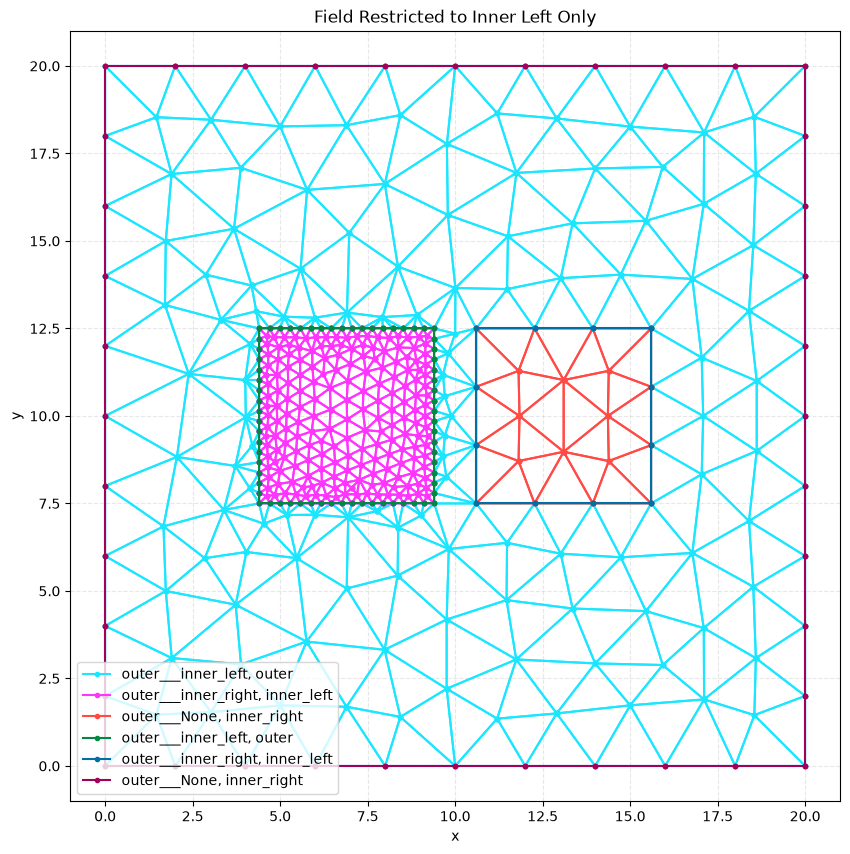
Once applied, a field can be restricted in its evaluation to specific entities using the restrict_to parameter.
This allows you to control which entities the resolution field affects, even when the field is defined on one entity.
# Create geometry: outer square with two inner squares
large_rect = 20
small_rect = 5

# Create outer square
outer_square = shapely.Polygon(
    [[0, 0], [large_rect, 0], [large_rect, large_rect], [0, large_rect], [0, 0]],
)

# Create smaller square that will be duplicated
inner_square = shapely.Polygon(
    [
        [large_rect / 2 - small_rect / 2, large_rect / 2 - small_rect / 2],
        [large_rect / 2 + small_rect / 2, large_rect / 2 - small_rect / 2],
        [large_rect / 2 + small_rect / 2, large_rect / 2 + small_rect / 2],
        [large_rect / 2 - small_rect / 2, large_rect / 2 + small_rect / 2],
        [large_rect / 2 - small_rect / 2, large_rect / 2 - small_rect / 2],
    ],
)

# Example 1: Field restricted to inner_left only
poly_outer = PolySurface(
    polygons=outer_square,
    mesh_order=2,
    physical_name="outer",
)

poly_left = PolySurface(
    polygons=shapely.affinity.translate(inner_square, xoff=-3.1),
    mesh_order=1,
    physical_name="inner_left",
)

poly_right = PolySurface(
    polygons=shapely.affinity.translate(inner_square, xoff=3.1),
    mesh_order=1,
    physical_name="inner_right",
)

write_xao(cad_occ([poly_outer, poly_left, poly_right]), "restricted_field_model.xao")

output_mesh = mesh(
    dim=2,
    input_file="restricted_field_model.xao",
    output_file="restricted_field_inner_only.msh",
    default_characteristic_length=2,
    resolution_specs={
        "inner_left": [
            ThresholdField(
                sizemin=0.3,
                distmax=10,
                sizemax=1.5,
                apply_to="curves",
                restrict_to=["inner_left"],  # Field only affects inner_left
            )
        ],
    },
)

plot2D(output_mesh, wireframe=True, title="Field Restricted to Inner Left Only")

# Example 2: Field restricted to both inner_left and outer

output_mesh = mesh(
    dim=2,
    input_file="restricted_field_model.xao",
    output_file="restricted_field_inner_and_outer.msh",
    default_characteristic_length=2,
    resolution_specs={
        "inner_left": [
            ThresholdField(
                sizemin=0.3,
                distmax=10,
                sizemax=1.5,
                apply_to="curves",
                restrict_to=[
                    "inner_left",
                    "outer",
                ],  # Field affects both inner_left and outer
            )
        ],
    },
)

plot2D(output_mesh, wireframe=True, title="Field Restricted to Inner Left and Outer")
Info    : Clearing all models and views...
Info    : Done clearing all models and views
Info    : Reading 'restricted_field_model.xao'...
Info    : Done reading 'restricted_field_model.xao'
Info    : Clearing all models and views...
Info    : Done clearing all models and views
Info    : Reading 'restricted_field_model.xao'...
Info    : Done reading 'restricted_field_model.xao'
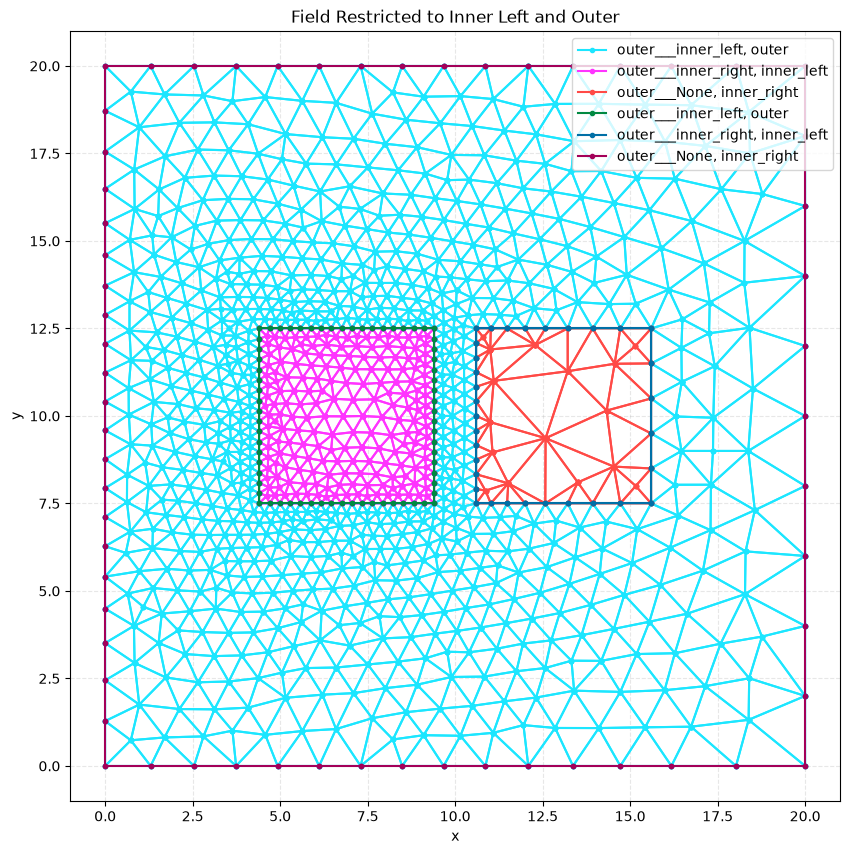
In the first example, the threshold field only affects the inner_left square, resulting in refined mesh elements only around that entity. In the second example, the field affects both the inner_left square and the outer square, causing mesh refinement to propagate through the outer square as well. The inner_right square maintains the default mesh size in both cases since it’s not included in the restrict_to list.