Adaptive Remeshing (MMG)#
The RemeshingStrategies can be passed to a MMG remesher.
Note: To use MMG remeshing, you need to install pymmg (e.g., pip install pymmg) or build MMG from source and ensure it’s accessible in your environment.
from pathlib import Path

import meshio
import numpy as np
import shapely

from meshwell.cad_occ import cad_occ
from meshwell.mesh import mesh
from meshwell.occ_xao_writer import write_xao
from meshwell.polyprism import PolyPrism
from meshwell.polysurface import PolySurface
from meshwell.remesh import (
    BinaryScalingStrategy,
    MMGRemeshingStrategy,
    remesh_mmg,
)
from meshwell.visualization import plot2D, plot3D
/home/runner/work/meshwell/meshwell/.venv/lib/python3.12/site-packages/tqdm/auto.py:21: TqdmWarning: IProgress not found. Please update jupyter and ipywidgets. See https://ipywidgets.readthedocs.io/en/stable/user_install.html
  from .autonotebook import tqdm as notebook_tqdm
Define Geometry#
We define two adjacent rectangles with different physical tags.
# Define geometry
large_rect = 10
mid_rect = 2

# Box 1: inner box
polygon1 = shapely.Polygon(
    [
        [-large_rect / 2, -mid_rect / 2],
        [large_rect / 2, -mid_rect / 2],
        [large_rect / 2, mid_rect / 2],
        [-large_rect / 2, mid_rect / 2],
        [-large_rect / 2, -mid_rect / 2],
    ],
)

# Box 2: global box
polygon2 = shapely.Polygon(
    [
        [-large_rect / 2, -large_rect / 2],
        [large_rect / 2, -large_rect / 2],
        [large_rect / 2, large_rect / 2],
        [-large_rect / 2, large_rect / 2],
        [-large_rect / 2, -large_rect / 2],
    ],
)

poly_obj1 = PolySurface(
    polygons=polygon1,
    mesh_order=1,
    physical_name="inner_box",
)
poly_obj2 = PolySurface(
    polygons=polygon2,
    mesh_order=2,
    physical_name="outer_box",
)

entities_list = [poly_obj1, poly_obj2]

# Generate CAD
write_xao(cad_occ(entities_list), "remesh_mmg_example.xao")
Initial Mesh#
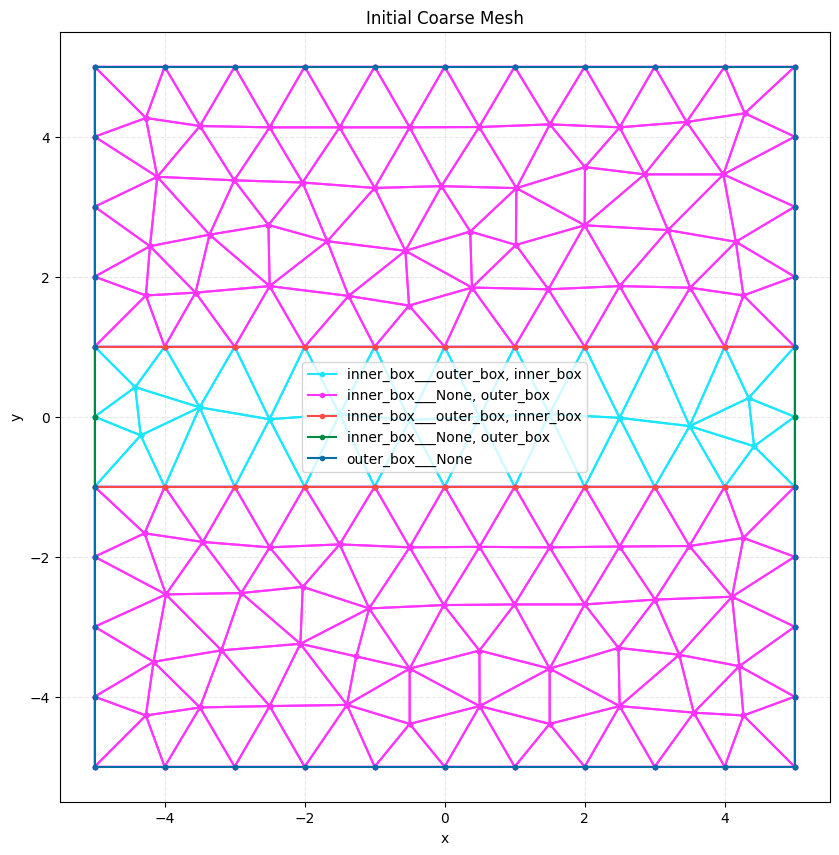
We generate a coarse initial mesh.
# Generate initial mesh
initial_mesh = mesh(
    dim=2,
    input_file="remesh_mmg_example.xao",
    output_file="remesh_mmg_example_initial.msh",
    default_characteristic_length=1.0,  # Coarse mesh
    n_threads=1,
    gmsh_version=2.2,
)
Info    : Clearing all models and views...
Info    : Done clearing all models and views
Info    : Reading 'remesh_mmg_example.xao'...
Info    : Done reading 'remesh_mmg_example.xao'
# Load initial mesh
initial_mesh = meshio.read("remesh_mmg_example_initial.msh")
print(f"Initial mesh points: {len(initial_mesh.points)}")
plot2D(initial_mesh, title="Initial Coarse Mesh", wireframe=True)
Initial mesh points: 148
Emulate input data for refinement#
We generate some fake data. This could be a solution, error, or any other quantity that you want to refine based on.
# Define oval parameters
center_x, center_y = 0.0, 0.0
radius_x, radius_y = 3.0, 3.0


def oval_looking_data(coords, _data=None):
    """Calculate solution/error based on proximity to oval boundary.

    Returns 1.0 if close to boundary, 0.0 otherwise.
    """
    x = coords[:, 0]
    y = coords[:, 1]

    # Normalized distance from center
    normalized_dist = ((x - center_x) ** 2 / radius_x**2) + (
        (y - center_y) ** 2 / radius_y**2
    )
    dist_from_boundary = np.abs(np.sqrt(normalized_dist) - 1.0)

    # Invert distance: high value near boundary
    # e.g., 1.0 at boundary, decaying to 0.0 at distance 1.0
    return np.maximum(0, 1.0 - dist_from_boundary)


# Calculate solution/error on initial mesh points
data_values = oval_looking_data(initial_mesh.points)

# refinement_data as (N, 4) -> x, y, z, data
refinement_data = np.column_stack([initial_mesh.points, data_values])
Use a strategy based on this data
# Create strategy with refinement_data
strategy = BinaryScalingStrategy(
    threshold=0.7,
    factor=0.2,
    refinement_data=refinement_data,
    min_size=0.1,
    max_size=2.0,
    field_smoothing_steps=2,
)
Perform Remeshing with MMG#
We use remesh_mmg to refine the mesh. Note that we don’t need to pass the geometry file for MMG, as it operates on the mesh directly (though preserving boundaries is handled by MMG’s internal logic).
size_map = remesh_mmg(
    input_mesh=initial_mesh,
    output_mesh=Path("remesh_mmg_example_final.msh"),
    strategies=[strategy],
    dim=2,
    verbosity=1,
    mmg_executable="mmg2d_O3",  # Ensure this is in your PATH or provide full path
)
---------------------------------------------------------------------------
FileNotFoundError                         Traceback (most recent call last)
Cell In[7], line 1
----> 1 size_map = remesh_mmg(
      2     input_mesh=initial_mesh,
      3     output_mesh=Path("remesh_mmg_example_final.msh"),
      4     strategies=[strategy],

File ~/work/meshwell/meshwell/meshwell/remesh.py:815, in remesh_mmg(input_mesh, output_mesh, strategies, dim, mmg_executable, verbosity, **kwargs)
    813 """Utility function for adaptive mesh refinement using MMG."""
    814 remesher = RemeshMMG(mmg_executable=mmg_executable, verbosity=verbosity)
--> 815 return remesher.remesh(
    816     input_mesh=input_mesh,
    817     output_mesh=output_mesh,
    818     strategies=strategies,
    819     dim=dim,
    820     **kwargs,
    821 )

File ~/work/meshwell/meshwell/meshwell/remesh.py:610, in RemeshMMG.remesh(self, input_mesh, output_mesh, strategies, dim, hmin, hmax, hausd, hgrad)
    602 final_sizes = interpolator(self.vxyz)
    604 # Also respect the baseline size at the node itself (already handled in compute_size_field logic?
    605 # compute_size_field combines strategies. If strategies didn't cover a node, it used baseline.
    606 # But if we have refinement data points, compute_size_field returns those points.
    607 # So interpolation is correct.)
    608
    609 # 3. Run MMG
--> 610 executable = self._find_executable()
    612 # Load meshio object for writing
    613 if isinstance(input_mesh, (str, Path)):

File ~/work/meshwell/meshwell/meshwell/remesh.py:545, in RemeshMMG._find_executable(self)
    542 if cwd_venv_bin.is_file():
    543     return str(cwd_venv_bin)
--> 545 raise FileNotFoundError(
    546     f"MMG executable '{self.mmg_executable}' not found. "
    547     "Please install MMG (e.g. `pip install pymmg`) or provide the full path."
    548 )

FileNotFoundError: MMG executable 'mmg2d_O3' not found. Please install MMG (e.g. `pip install pymmg`) or provide the full path.
Visualize Result#
We load and plot the final mesh to see the refinement.
final_mesh = meshio.read("remesh_mmg_example_final.msh")
print(f"Final mesh points: {len(final_mesh.points)}")
print("Final mesh physical groups:", final_mesh.field_data)

plot2D(final_mesh, title="Adaptive Remesh with MMG (Oval Refinement)", wireframe=True)
Multiple Strategies with Grid Evaluation#
Just like the GMSH remesher, we can use multiple strategies and grid-based evaluation.
# Generate a dense grid of points
x = np.linspace(-large_rect / 2, large_rect / 2, 100)
y = np.linspace(-large_rect / 2, large_rect / 2, 100)
X, Y = np.meshgrid(x, y)
grid_coords = np.column_stack([X.ravel(), Y.ravel(), np.zeros_like(X.ravel())])

# Evaluate solution/error on the grid
grid_data = oval_looking_data(grid_coords)
grid_refinement_data = np.column_stack([grid_coords, grid_data])

grid_strategy = BinaryScalingStrategy(
    func=oval_looking_data,
    threshold=0.8,
    factor=0.2,
    refinement_data=grid_refinement_data,
    min_size=0.1,
    max_size=2.0,
)
Multiple Strategies#
We can combine multiple strategies to refine different regions. Here we’ll refine around a circle and along a vertical line.
# Define circle parameters
circle_center_x, circle_center_y = 2.0, 2.0
circle_radius = 1.5


def circle_looking_data(coords, data=None):
    """Calculate solution/error based on proximity to circle boundary."""
    if data is not None:
        return data

    x = coords[:, 0]
    y = coords[:, 1]

    # Distance from circle center
    dist_from_center = np.sqrt((x - circle_center_x) ** 2 + (y - circle_center_y) ** 2)
    dist_from_boundary = np.abs(dist_from_center - circle_radius)

    # High value near boundary
    return np.maximum(0, 1.0 - dist_from_boundary / 0.5)


# Define line parameters (vertical line at x = -2)
line_x = -2.0
line_width = 0.3


def line_looking_data(coords, data=None):
    """Calculate solution/error based on proximity to vertical line."""
    if data is not None:
        return data

    x = coords[:, 0]

    # Distance from line
    dist_from_line = np.abs(x - line_x)

    # High value near line
    return np.maximum(0, 1.0 - dist_from_line / line_width)


# Create strategies
# Note: We can pass data if we want to pre-calculate, but here we let the function evaluate on the mesh nodes
circle_strategy = BinaryScalingStrategy(
    func=circle_looking_data,
    threshold=0.5,
    factor=0.15,
    min_size=0.05,
    max_size=2.0,
    refinement_data=None,
)

line_strategy = BinaryScalingStrategy(
    func=line_looking_data,
    threshold=0.4,
    factor=0.2,
    min_size=0.08,
    max_size=2.0,
    refinement_data=None,
)

# Combine strategies
multi_size_map = remesh_mmg(
    input_mesh=initial_mesh,
    output_mesh=Path("remesh_mmg_example_multi.msh"),
    strategies=[circle_strategy, line_strategy],
    dim=2,
    verbosity=1,
)

# Load and visualize the final mesh
multi_mesh = meshio.read("remesh_mmg_example_multi.msh")
print(f"Multi-strategy mesh points: {len(multi_mesh.points)}")
plot2D(
    multi_mesh,
    title="Multi-Strategy Refinement with MMG (Circle + Line)",
    wireframe=True,
)
3D Remeshing (MMG)#
We can also remesh 3D geometries using MMG3D. Here we’ll create a prism using PolyPrism and refine it. We will also use MMGRemeshingStrategy, which directly exposes the MMG parameters.
# Create a 3D prism geometry

# Define base polygon
polygon = shapely.Polygon([[-2, -2], [2, -2], [2, 2], [-2, 2], [-2, -2]])

# Define buffers for extrusion (z-levels)
buffers = {0.0: 0.0, 4.0: 0.0}  # Extrude from z=0 to z=4

poly_prism = PolyPrism(
    polygons=polygon,
    buffers=buffers,
    physical_name="my_prism",
)

# Generate CAD
write_xao(cad_occ([poly_prism]), "remesh_mmg_example_3d.xao")

# Generate initial 3D mesh
mesh_3d_initial = mesh(
    dim=3,
    input_file="remesh_mmg_example_3d.xao",
    output_file="remesh_mmg_example_3d_initial.msh",
    default_characteristic_length=1.0,
)

# Visualize initial mesh
print(f"3D Initial mesh points: {len(mesh_3d_initial.points)}")
plot3D(mesh_3d_initial, title="3D Initial Mesh")

# Define spherical strategy
sphere_center = np.array([0.0, 0.0, 2.0])  # Center in the prism
sphere_radius = 1.0


def sphere_looking_data(coords, data=None):
    """Calculate solution/error based on proximity to sphere."""
    if data is not None:
        return data

    # Distance from sphere center
    dist = np.linalg.norm(coords - sphere_center, axis=1)
    dist_from_boundary = np.abs(dist - sphere_radius)

    # High value near boundary
    return np.maximum(0, 1.0 - dist_from_boundary / 0.5)


# Define spherical strategy using MMGRemeshingStrategy to pass hausd
sphere_strategy = MMGRemeshingStrategy(
    func=sphere_looking_data,
    threshold=0.5,
    factor=0.5,
    min_size=0.2,
    max_size=1.0,
    refinement_data=None,
    hausd=0.01,  # Control Hausdorff distance for better surface approximation
    hgrad=1.3,  # Control gradation
)

# Remesh 3D with MMG
try:
    size_map_3d = remesh_mmg(
        input_mesh=Path("remesh_mmg_example_3d_initial.msh"),
        output_mesh=Path("remesh_mmg_example_3d_final.msh"),
        strategies=[sphere_strategy],
        dim=3,
        verbosity=1,
        mmg_executable="mmg3d_O3",  # Use MMG3D for 3D meshes
    )

    # Visualize final mesh
    mesh_3d_final = meshio.read("remesh_mmg_example_3d_final.msh")
    print(f"3D Final mesh points: {len(mesh_3d_final.points)}")
    plot3D(mesh_3d_final, title="3D Remeshing (MMG)")
except Exception as e:
    print(f"3D remeshing failed (likely due to missing executable): {e}")
# Clean up files
for f in [
    "remesh_mmg_example.xao",
    "remesh_mmg_example_initial.msh",
    "remesh_mmg_example_final.msh",
    "remesh_mmg_example_multi.msh",
    "remesh_mmg_example_soft.msh",
    "remesh_mmg_example_3d_initial.msh",
    "remesh_mmg_example_3d_final.msh",
]:
    Path(f).unlink(missing_ok=True)