Direct Size Specification#
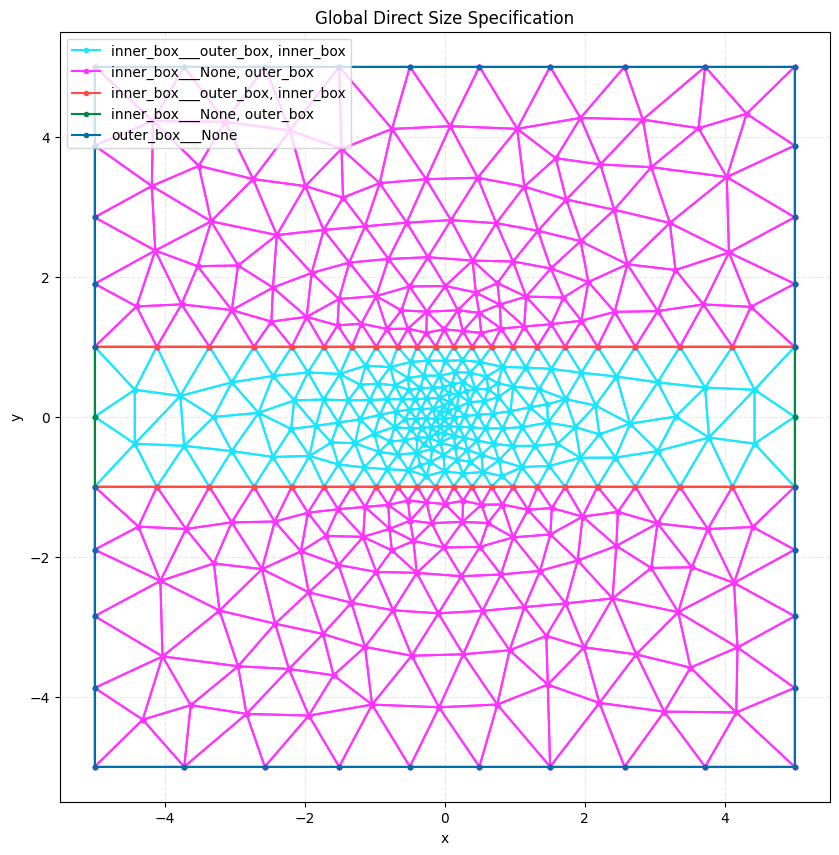
Meshwell allows you to directly specify the desired mesh size at each point in space using DirectSizeSpecification.
This is useful when you have a pre-calculated size field (e.g., from a physics simulation or an analytical function)
and want to generate a mesh that respects it during the initial meshing process.
Unlike adaptive remeshing, which refines an existing mesh, DirectSizeSpecification is applied during the
generation of the mesh from the CAD geometry.
from pathlib import Path

import numpy as np
import shapely

from meshwell.cad_occ import cad_occ
from meshwell.mesh import mesh
from meshwell.occ_xao_writer import write_xao
from meshwell.polysurface import PolySurface
from meshwell.resolution import ConstantInField, DirectSizeSpecification
from meshwell.visualization import plot2D
/home/runner/work/meshwell/meshwell/.venv/lib/python3.12/site-packages/tqdm/auto.py:21: TqdmWarning: IProgress not found. Please update jupyter and ipywidgets. See https://ipywidgets.readthedocs.io/en/stable/user_install.html
  from .autonotebook import tqdm as notebook_tqdm
Define Geometry with Multiple Entities#
We’ll define two adjacent rectangles with different physical tags to demonstrate entity-specific application.
# Define geometry
large_rect = 10
mid_rect = 2

# Box 1: inner box
polygon1 = shapely.Polygon(
    [
        [-large_rect / 2, -mid_rect / 2],
        [large_rect / 2, -mid_rect / 2],
        [large_rect / 2, mid_rect / 2],
        [-large_rect / 2, mid_rect / 2],
        [-large_rect / 2, -mid_rect / 2],
    ],
)

# Box 2: global box
polygon2 = shapely.Polygon(
    [
        [-large_rect / 2, -large_rect / 2],
        [large_rect / 2, -large_rect / 2],
        [large_rect / 2, large_rect / 2],
        [-large_rect / 2, large_rect / 2],
        [-large_rect / 2, -large_rect / 2],
    ],
)

poly_obj1 = PolySurface(
    polygons=polygon1,
    mesh_order=1,
    physical_name="inner_box",
)
poly_obj2 = PolySurface(
    polygons=polygon2,
    mesh_order=2,
    physical_name="outer_box",
)

# Generate CAD
write_xao(cad_occ([poly_obj1, poly_obj2]), "direct_size_example.xao")
Define Size Field#
We’ll define a size field that varies radially from the center.
def radial_size_function(coords):
    """Define mesh size as a function of distance from center."""
    x = coords[:, 0]
    y = coords[:, 1]

    # Distance from center
    dist_from_center = np.sqrt(x**2 + y**2)

    # Size grows linearly with distance: 0.1 at center, 1.0 at distance 5
    size = 0.1 + (dist_from_center / 5.0) * 0.9

    # Clip to reasonable range
    return np.clip(size, 0.05, 1.5)


# Generate evaluation grid
x_direct = np.linspace(-large_rect / 2, large_rect / 2, 60)
y_direct = np.linspace(-large_rect / 2, large_rect / 2, 60)
X_direct, Y_direct = np.meshgrid(x_direct, y_direct)
direct_coords = np.column_stack(
    [X_direct.ravel(), Y_direct.ravel(), np.zeros_like(X_direct.ravel())]
)

# Evaluate size function
direct_sizes = radial_size_function(direct_coords)

# Create refinement data (N, 4) -> x, y, z, size
direct_refinement_data = np.column_stack([direct_coords, direct_sizes])
Case 1: Global Application#
We apply the specification globally to the entire model using None as the key.
size_spec_global = DirectSizeSpecification(
    refinement_data=direct_refinement_data,
    min_size=0.05,
    max_size=1.5,
)

mesh_global = mesh(
    dim=2,
    input_file="direct_size_example.xao",
    output_file="direct_size_global.msh",
    default_characteristic_length=2.0,
    resolution_specs={None: [size_spec_global]},  # Global application
    n_threads=1,
)

plot2D(mesh_global, title="Global Direct Size Specification", wireframe=True)
Info    : Clearing all models and views...
Info    : Done clearing all models and views
Info    : Reading 'direct_size_example.xao'...
Info    : Done reading 'direct_size_example.xao'
Case 2: Combining with Other Resolution Specs#
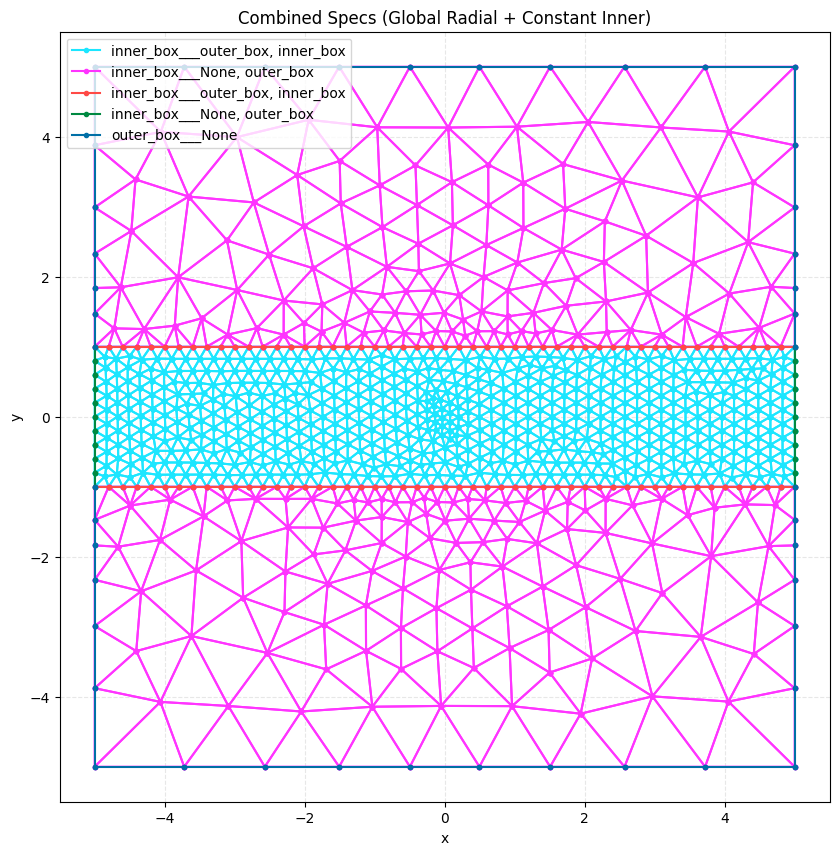
We can combine DirectSizeSpecification with other specs like ConstantInField.
GMSH will take the minimum size requested by all active fields at any point.
Here, we apply:
The radial size field globally.
A constant fine resolution (0.2) specifically to the “inner_box”.
Inside the inner box, the size will be min(radial_field, 0.2). Since the radial field is ~0.1 at the center
and grows, this will effectively cap the size at 0.2 in the inner box, while allowing it to be smaller near the center.
constant_spec = ConstantInField(
    apply_to="surfaces", resolution=0.2  # In 2D, we apply to surfaces
)

mesh_combined = mesh(
    dim=2,
    input_file="direct_size_example.xao",
    output_file="direct_size_combined.msh",
    default_characteristic_length=2.0,
    resolution_specs={
        None: [size_spec_global],  # Global radial field
        "inner_box": [constant_spec],  # Constant fine mesh in inner box
    },
    n_threads=1,
)

plot2D(
    mesh_combined,
    title="Combined Specs (Global Radial + Constant Inner)",
    wireframe=True,
)
Info    : Clearing all models and views...
Info    : Done clearing all models and views
Info    : Reading 'direct_size_example.xao'...
Info    : Done reading 'direct_size_example.xao'
# Clean up files
Path("direct_size_example.xao").unlink(missing_ok=True)
Path("direct_size_global.msh").unlink(missing_ok=True)
Path("direct_size_combined.msh").unlink(missing_ok=True)