Importing and processing GDS#
Meshwell has utility functions to load gds shapes as Shapely MultiPolygons, which subsequently easily allows them to be modified and added to a Meshwell model as PolySurfaces and Prisms.
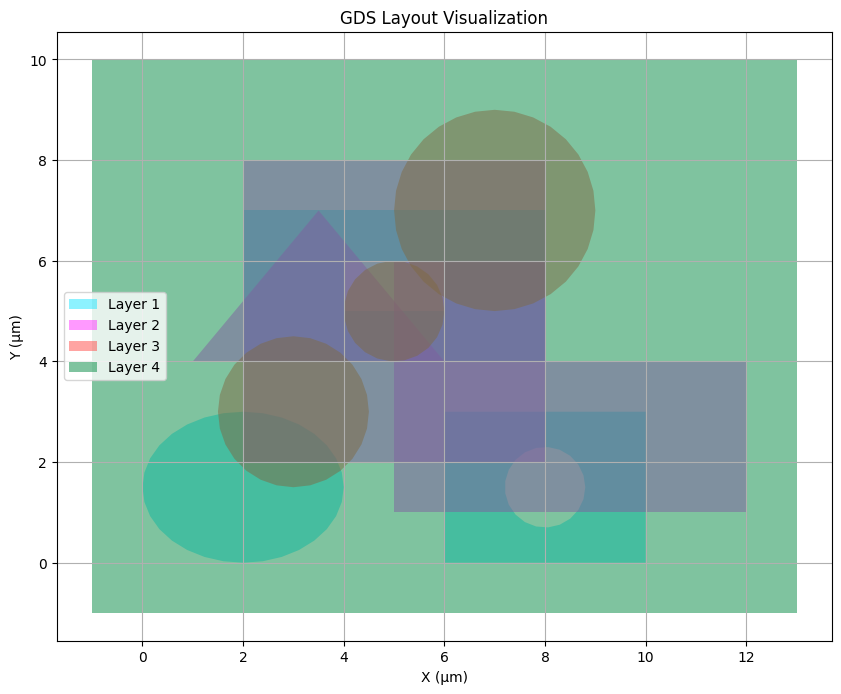
First, assume we have a GDS file (here we write a small one with gdstk):
import gdstk
import matplotlib.pyplot as plt
import shapely
import shapely.geometry as sg

from meshwell.cad_occ import cad_occ
from meshwell.import_gds import read_gds_layers
from meshwell.mesh import mesh
from meshwell.occ_xao_writer import write_xao
from meshwell.polysurface import PolySurface
from meshwell.visualization import colors, plot2D

lib = gdstk.Library()
cell = lib.new_cell("TOP")

# Layer 1: Mix of shapes with holes
rect1a = gdstk.ellipse((2, 1.5), (2, 1.5), layer=1, datatype=0)
# Rectangle with circular hole
outer = gdstk.rectangle((6, 0), (10, 3), layer=1, datatype=0)
hole = gdstk.ellipse((8, 1.5), 0.8, layer=1, datatype=0)
poly1b = gdstk.boolean(outer, hole, "not", layer=1, datatype=0)
# Rectangle with rectangular hole
outer2 = gdstk.rectangle((2, 4), (8, 7), layer=1, datatype=0)
hole2 = gdstk.rectangle((4, 5), (6, 6), layer=1, datatype=0)
poly1c = gdstk.boolean(outer2, hole2, "not", layer=1, datatype=0)

# Layer 2: Simple non-intersecting shapes
rect2a = gdstk.rectangle((2, 2), (8, 8), layer=2, datatype=0)
# L-shaped polygon
points2b = [(5, 1), (12, 1), (12, 4), (8, 4), (8, 6), (5, 6)]
poly2b = gdstk.Polygon(points2b, layer=2, datatype=0)
# Triangle
points2c = [(1, 4), (6, 4), (3.5, 7)]
poly2c = gdstk.Polygon(points2c, layer=2, datatype=0)

# Layer 3: Multiple circles
circle1 = gdstk.ellipse((3, 3), 1.5, layer=3, datatype=0)
circle2 = gdstk.ellipse((7, 7), 2, layer=3, datatype=0)
circle3 = gdstk.ellipse((5, 5), 1, layer=3, datatype=0)

# Add all shapes to cell
shapes = [rect1a, poly1b, poly1c, rect2a, poly2b, poly2c, circle1, circle2, circle3]
for shape in shapes:
    if isinstance(shape, list):
        for subshape in shape:
            cell.add(subshape)
    else:
        cell.add(shape)

# Layer 4: Encompassing rectangle
# Calculate bounds of all shapes
xmin = float("inf")
xmax = float("-inf")
ymin = float("inf")
ymax = float("-inf")

for shape in shapes:
    shape_list = shape if isinstance(shape, list) else [shape]

    for s in shape_list:
        bbox = s.bounding_box()
        if bbox is not None:
            xmin = min(xmin, bbox[0][0])
            ymin = min(ymin, bbox[0][1])
            xmax = max(xmax, bbox[1][0])
            ymax = max(ymax, bbox[1][1])

# Add some padding
padding = 1.0
encompassing_rect = gdstk.rectangle(
    (xmin - padding, ymin - padding),
    (xmax + padding, ymax + padding),
    layer=4,
    datatype=0,
)
cell.add(encompassing_rect)


lib.write_gds("example.gds")
/home/runner/work/meshwell/meshwell/.venv/lib/python3.12/site-packages/tqdm/auto.py:21: TqdmWarning: IProgress not found. Please update jupyter and ipywidgets. See https://ipywidgets.readthedocs.io/en/stable/user_install.html
  from .autonotebook import tqdm as notebook_tqdm
# Visualize the GDS file
fig, ax = plt.subplots(figsize=(10, 10))

# Plot polygons
for polygon in cell.polygons:
    layer = polygon.layer
    points = [(float(x), float(y)) for x, y in polygon.points]
    if len(points) >= 3:
        x, y = zip(*points)
        ax.fill(x, y, alpha=0.5, fc=colors[layer - 1], label=f"Layer {layer}")

# Remove duplicate labels
handles, labels = plt.gca().get_legend_handles_labels()
by_label = dict(zip(labels, handles))
plt.legend(by_label.values(), by_label.keys())

ax.set_aspect("equal")
ax.grid(True)
plt.title("GDS Layout Visualization")
plt.xlabel("X (μm)")
plt.ylabel("Y (μm)")
plt.show()
# Loading GDS/OASIS layers#
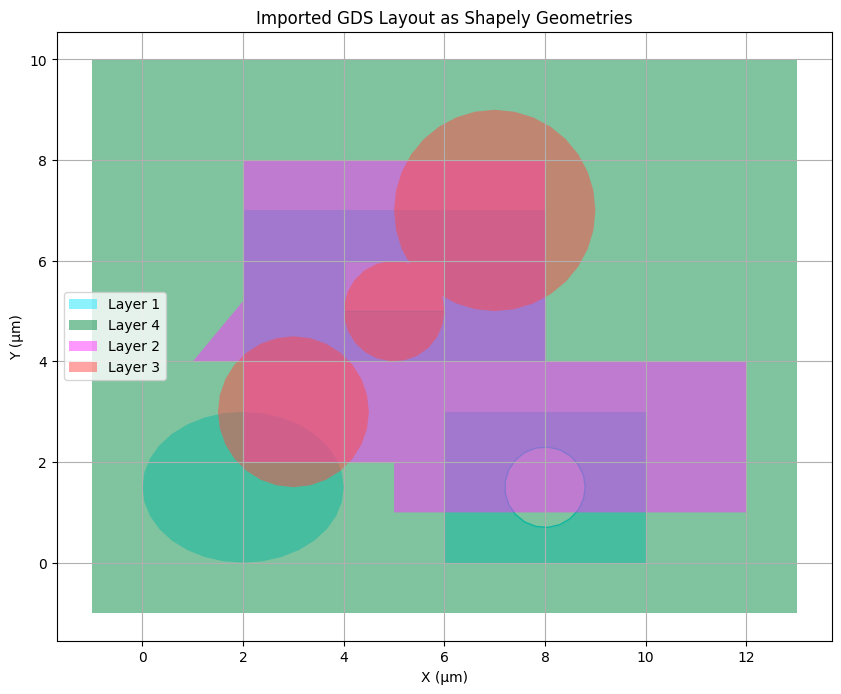
We can import shapes as a shapely dict of layer: multipolygon:
gds_as_shapely_dict = read_gds_layers(gds_file="example.gds", cell_name="TOP")
gds_as_shapely_dict
{(1,
  0): <MULTIPOLYGON (((3.962 1.207, 3.848 0.926, 3.663 0.667, 3.414 0.439, 3.111 0...>,
 (4, 0): <POLYGON ((-1 -1, 13 -1, 13 10, -1 10, -1 -1))>,
 (2,
  0): <POLYGON ((12 4, 12 1, 5 1, 5 2, 2 2, 2 4, 1 4, 2 5.2, 2 8, 8 8, 8 6, 8 4, 1...>,
 (3,
  0): <MULTIPOLYGON (((4.462 2.666, 4.351 2.349, 4.173 2.065, 3.935 1.827, 3.651 1...>}
# Plot the shapely geometries from each layer
fig, ax = plt.subplots(figsize=(10, 10))

# Plot the shapely geometries
for layer, geometry in gds_as_shapely_dict.items():
    # Skip empty geometries
    if geometry.is_empty:
        continue

    # Handle both MultiPolygons and single Polygons
    if isinstance(geometry, sg.MultiPolygon):
        # Plot each polygon in the MultiPolygon
        for poly in geometry.geoms:
            # Plot exterior boundary and holes
            x, y = poly.exterior.xy
            ax.fill(x, y, alpha=0.5, fc=colors[layer[0] - 1], label=f"Layer {layer[0]}")

            # Plot interior holes by setting the face color to white
            for interior in poly.interiors:
                x, y = interior.xy
                ax.fill(x, y, fc="white", ec=colors[layer[0] - 1])
    else:
        # Single polygon case - plot exterior and holes
        x, y = geometry.exterior.xy
        ax.fill(x, y, alpha=0.5, fc=colors[layer[0] - 1], label=f"Layer {layer[0]}")

        # Plot interior holes by setting the face color to white
        for interior in geometry.interiors:
            x, y = interior.xy
            ax.fill(x, y, fc="white", ec=colors[layer[0] - 1])

# Remove duplicate labels
handles, labels = plt.gca().get_legend_handles_labels()
by_label = dict(zip(labels, handles))
plt.legend(by_label.values(), by_label.keys())

ax.set_aspect("equal")
ax.grid(True)
plt.title("Imported GDS Layout as Shapely Geometries")
plt.xlabel("X (μm)")
plt.ylabel("Y (μm)")
plt.show()
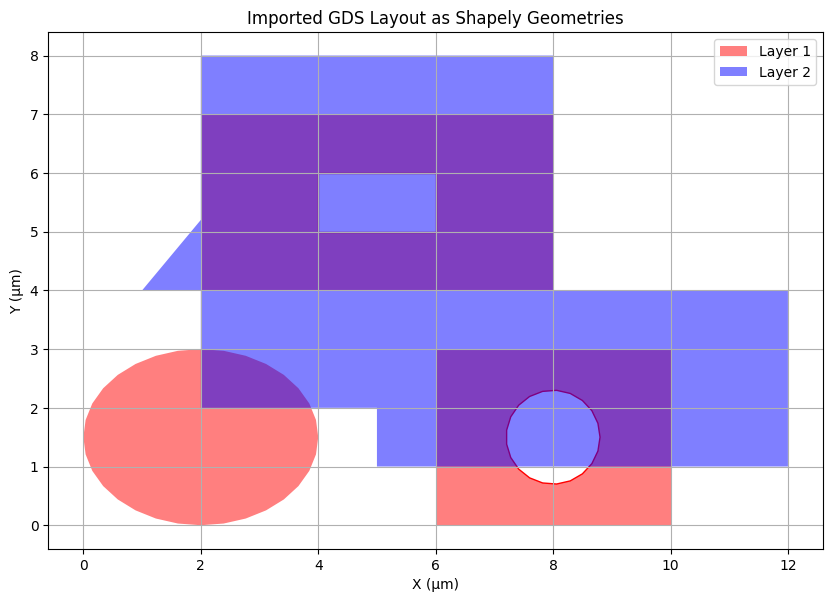
If we only cared about some layers, we could subsample:
gds_as_shapely_dict_filtered = read_gds_layers(
    gds_file="example.gds", cell_name="TOP", layers=[(1, 0), (2, 0)]
)
gds_as_shapely_dict_filtered
{(1,
  0): <MULTIPOLYGON (((3.962 1.207, 3.848 0.926, 3.663 0.667, 3.414 0.439, 3.111 0...>,
 (2,
  0): <POLYGON ((12 4, 12 1, 5 1, 5 2, 2 2, 2 4, 1 4, 2 5.2, 2 8, 8 8, 8 6, 8 4, 1...>}
# Plot the shapely geometries from each layer
fig, ax = plt.subplots(figsize=(10, 10))

colors = ["red", "blue", "green"]
# Plot the shapely geometries
for layer, geometry in gds_as_shapely_dict_filtered.items():
    # Skip empty geometries
    if geometry.is_empty:
        continue

    # Handle both MultiPolygons and single Polygons
    if isinstance(geometry, sg.MultiPolygon):
        # Plot each polygon in the MultiPolygon
        for poly in geometry.geoms:
            # Plot exterior boundary and holes
            x, y = poly.exterior.xy
            ax.fill(x, y, alpha=0.5, fc=colors[layer[0] - 1], label=f"Layer {layer[0]}")

            # Plot interior holes by setting the face color to white
            for interior in poly.interiors:
                x, y = interior.xy
                ax.fill(x, y, fc="white", ec=colors[layer[0] - 1])
    else:
        # Single polygon case - plot exterior and holes
        x, y = geometry.exterior.xy
        ax.fill(x, y, alpha=0.5, fc=colors[layer[0] - 1], label=f"Layer {layer[0]}")

        # Plot interior holes by setting the face color to white
        for interior in geometry.interiors:
            x, y = interior.xy
            ax.fill(x, y, fc="white", ec=colors[layer[0] - 1])

# Remove duplicate labels
handles, labels = plt.gca().get_legend_handles_labels()
by_label = dict(zip(labels, handles))
plt.legend(by_label.values(), by_label.keys())

ax.set_aspect("equal")
ax.grid(True)
plt.title("Imported GDS Layout as Shapely Geometries")
plt.xlabel("X (μm)")
plt.ylabel("Y (μm)")
plt.show()
Notes:
Overlapping polygons are united
GDS self-intersections are converted to shapely holes
# Processing layers#
Now that we have Shapely multipolygons, we can process them to define meshwell Polysurfaces or Prisms. This is useful to convert the design layers represented by the GDS to the fabricated layers that we want to mesh:
Create new polygons from combinations of polygons (for instance, defining an etched geometry from a substrate and etch regions, or growing material only where a substrate and a mask intersect)
# Helper function to plot shapely geometries
def plot_geometry(geometry, title=None, color="blue", alpha=0.5, show_layer4=True):
    _fig, ax = plt.subplots(figsize=(8, 8))

    # Plot the main geometry
    if isinstance(geometry, sg.MultiPolygon):
        for poly in geometry.geoms:
            x, y = poly.exterior.xy
            ax.fill(x, y, alpha=alpha, fc=color)
            for interior in poly.interiors:
                x, y = interior.xy
                ax.fill(x, y, fc="white", ec=color)
    else:
        x, y = geometry.exterior.xy
        ax.fill(x, y, alpha=alpha, fc=color)
        for interior in geometry.interiors:
            x, y = interior.xy
            ax.fill(x, y, fc="white", ec=color)

    # Plot layer 4 for reference
    if show_layer4:
        layer4 = gds_as_shapely_dict.get((4, 0))
        if layer4 is not None:
            if isinstance(layer4, sg.MultiPolygon):
                for poly in layer4.geoms:
                    x, y = poly.exterior.xy
                    ax.fill(x, y, alpha=0.3, fc="gray")
                    for interior in poly.interiors:
                        x, y = interior.xy
                        ax.fill(x, y, fc="white", ec="gray")
            else:
                x, y = layer4.exterior.xy
                ax.fill(x, y, alpha=0.3, fc="gray")
                for interior in layer4.interiors:
                    x, y = interior.xy
                    ax.fill(x, y, fc="white", ec="gray")

    ax.set_aspect("equal")
    ax.grid(True)
    if title:
        plt.title(title)
    plt.xlabel("X (μm)")
    plt.ylabel("Y (μm)")
    if show_layer4:
        plt.legend()
    plt.show()
# Get layer 1 and 2 geometries for examples
geom1 = gds_as_shapely_dict_filtered[(1, 0)]
geom2 = gds_as_shapely_dict_filtered[(2, 0)]
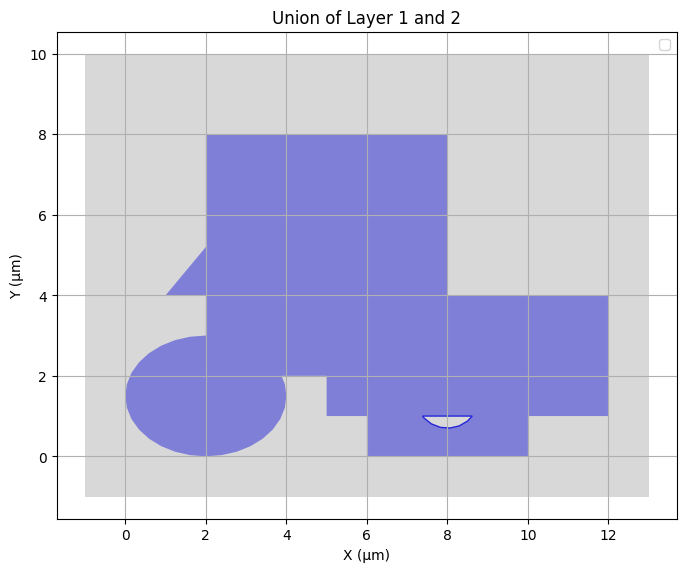
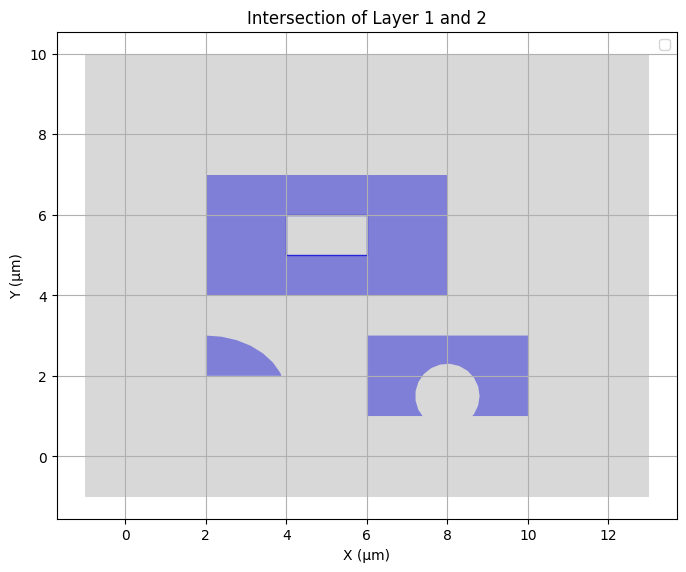
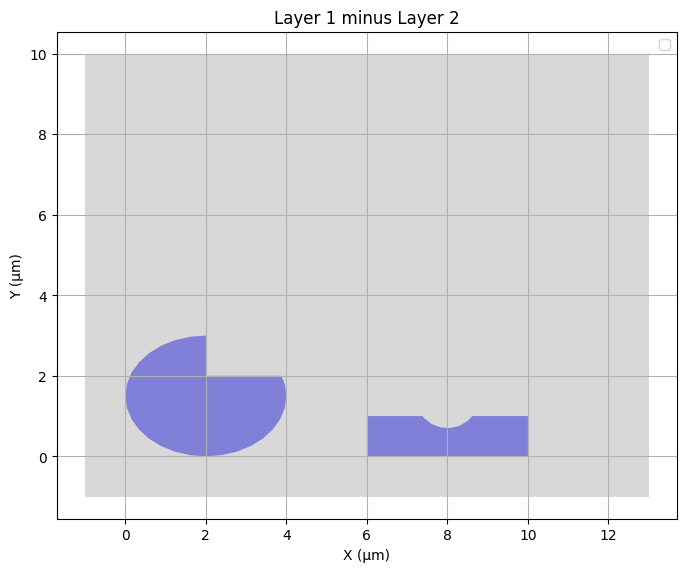
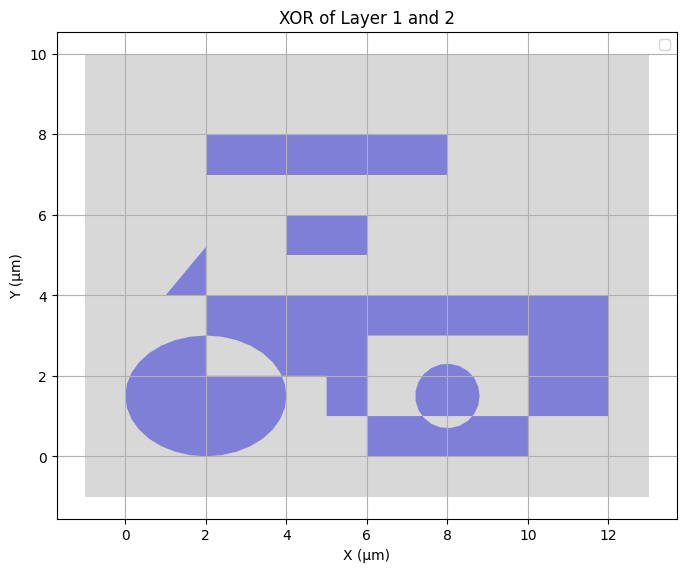
Boolean operations are useful to obtain physical layers that are combinations of design layers. Examples include obtaining the polygons defined by a substrate and an etch mask (using difference of two layers), or the polygons from the masked growth of material (using intersection of layers).
plot_geometry(geom1.union(geom2), "Union of Layer 1 and 2")
plot_geometry(geom1.intersection(geom2), "Intersection of Layer 1 and 2")
plot_geometry(geom1.difference(geom2), "Layer 1 minus Layer 2")
plot_geometry(geom1.symmetric_difference(geom2), "XOR of Layer 1 and 2")
/tmp/ipykernel_2806/2754610462.py:45: UserWarning: No artists with labels found to put in legend.  Note that artists whose label start with an underscore are ignored when legend() is called with no argument.
  plt.legend()
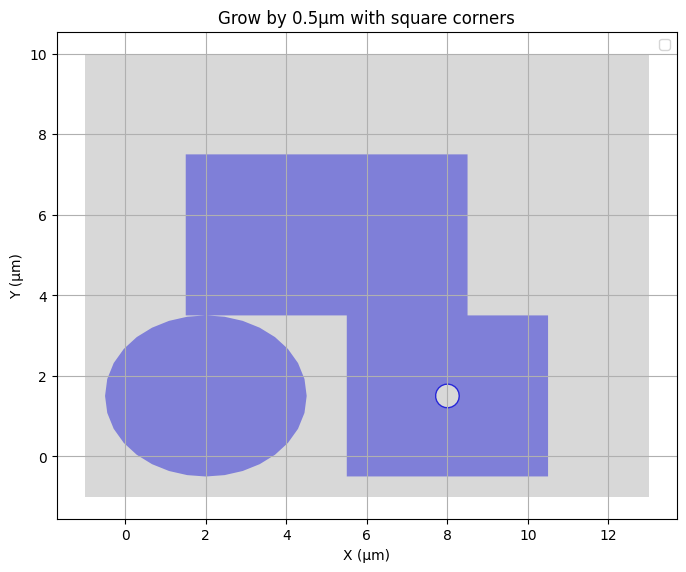
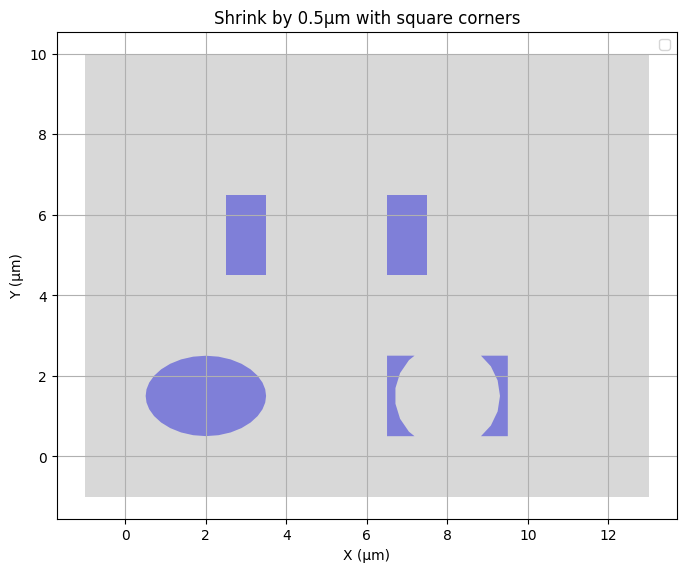
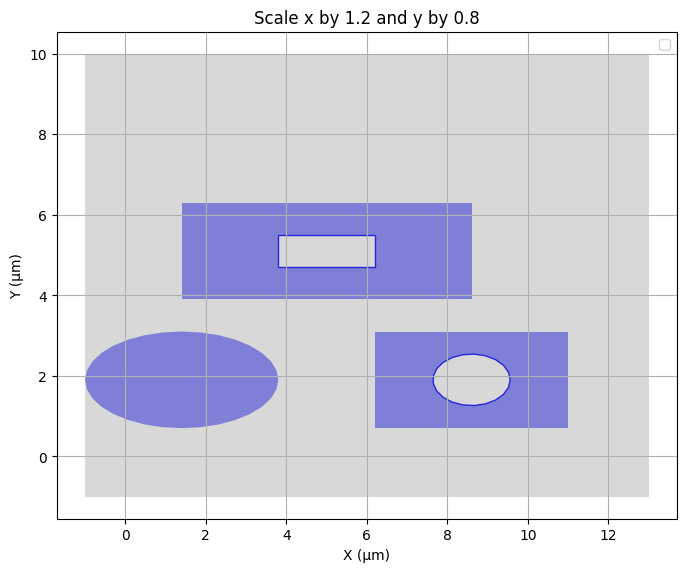
Buffering and scaling can change the size of polygons. This can capture process bias.
plot_geometry(
    geom1.buffer(0.5, join_style="mitre", cap_style="square"),
    "Grow by 0.5μm with square corners",
)

plot_geometry(
    geom1.buffer(-0.5, join_style="mitre", cap_style="square"),
    "Shrink by 0.5μm with square corners",
)

# Scale
plot_geometry(
    shapely.affinity.scale(geom1, xfact=1.2, yfact=0.8), "Scale x by 1.2 and y by 0.8"
)
/tmp/ipykernel_2806/2754610462.py:45: UserWarning: No artists with labels found to put in legend.  Note that artists whose label start with an underscore are ignored when legend() is called with no argument.
  plt.legend()
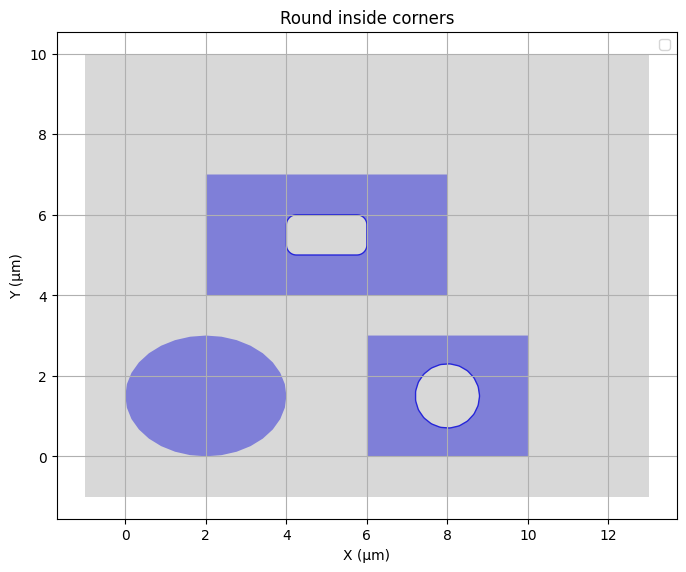
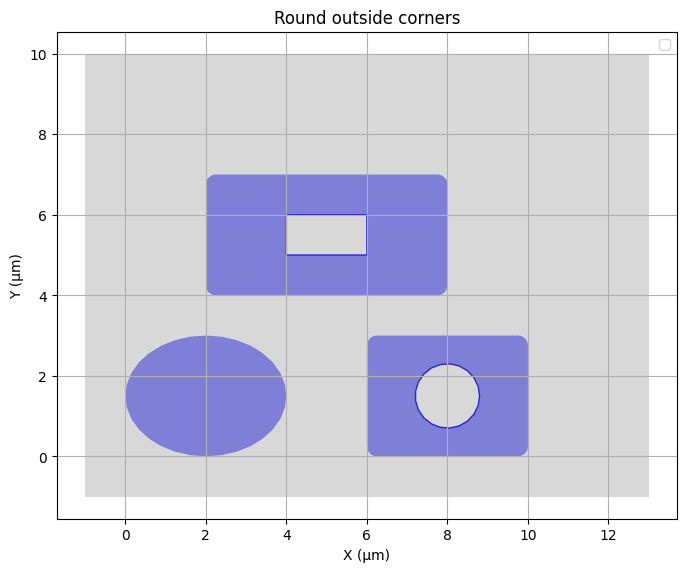
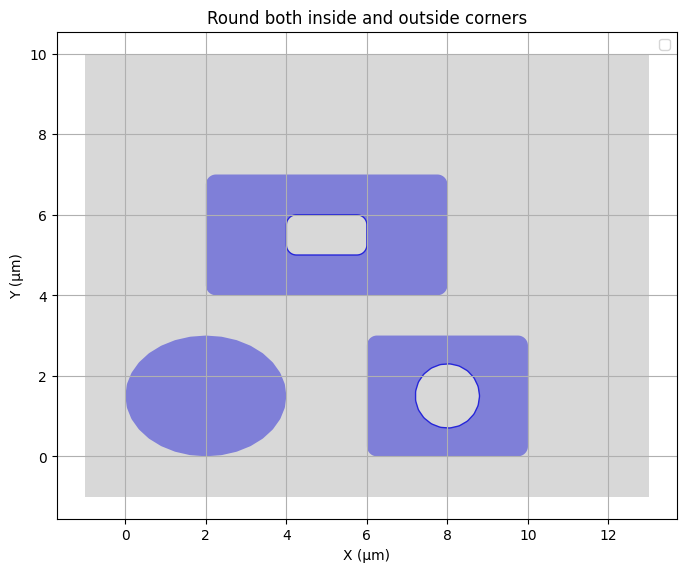
Buffering can also be used to round corners:
plot_geometry(
    geom1.buffer(0.25, join_style="round", cap_style="round").buffer(
        -0.25, join_style="round", cap_style="round"
    ),
    "Round inside corners",
)

plot_geometry(
    geom1.buffer(-0.25, join_style="round", cap_style="round").buffer(
        0.25, join_style="round", cap_style="round"
    ),
    "Round outside corners",
)

plot_geometry(
    geom1.buffer(0.25, join_style="round", cap_style="round")
    .buffer(-0.25, join_style="round", cap_style="round")
    .buffer(-0.25, join_style="round", cap_style="round")
    .buffer(0.25, join_style="round", cap_style="round"),
    "Round both inside and outside corners",
)
/tmp/ipykernel_2806/2754610462.py:45: UserWarning: No artists with labels found to put in legend.  Note that artists whose label start with an underscore are ignored when legend() is called with no argument.
  plt.legend()
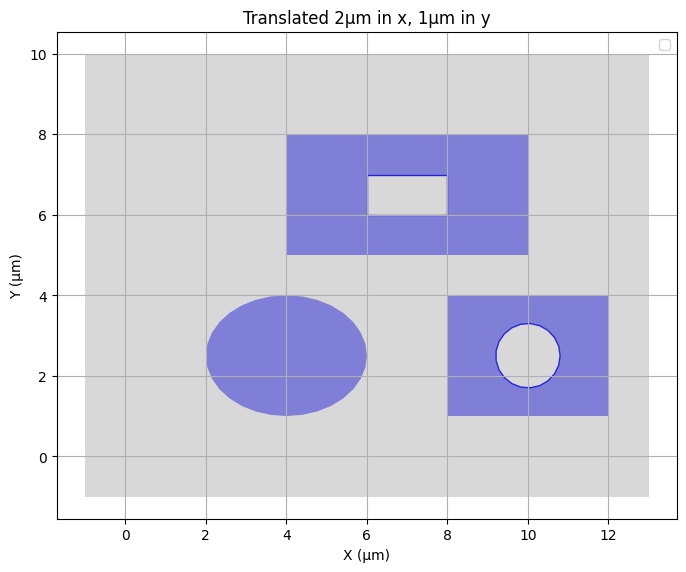
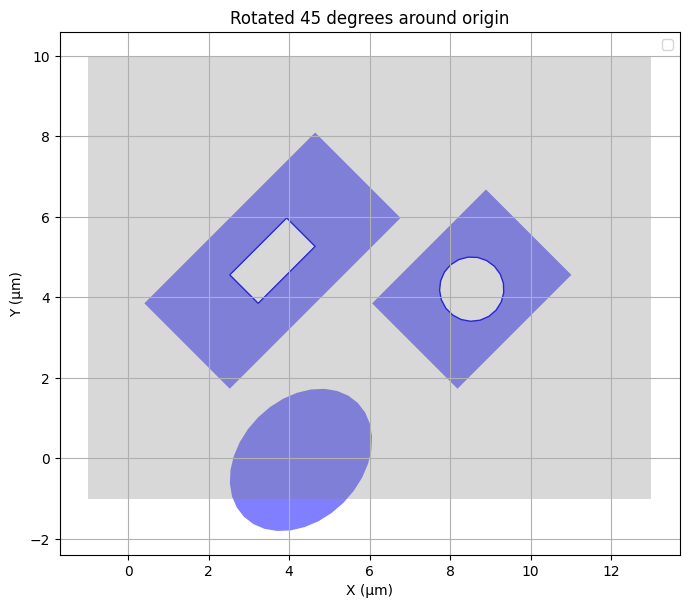
Translations and rotations can capture interlayer misalignments:
plot_geometry(
    shapely.affinity.translate(geom1, xoff=2, yoff=1), "Translated 2μm in x, 1μm in y"
)
plot_geometry(shapely.affinity.rotate(geom1, 45), "Rotated 45 degrees around origin")
/tmp/ipykernel_2806/2754610462.py:45: UserWarning: No artists with labels found to put in legend.  Note that artists whose label start with an underscore are ignored when legend() is called with no argument.
  plt.legend()
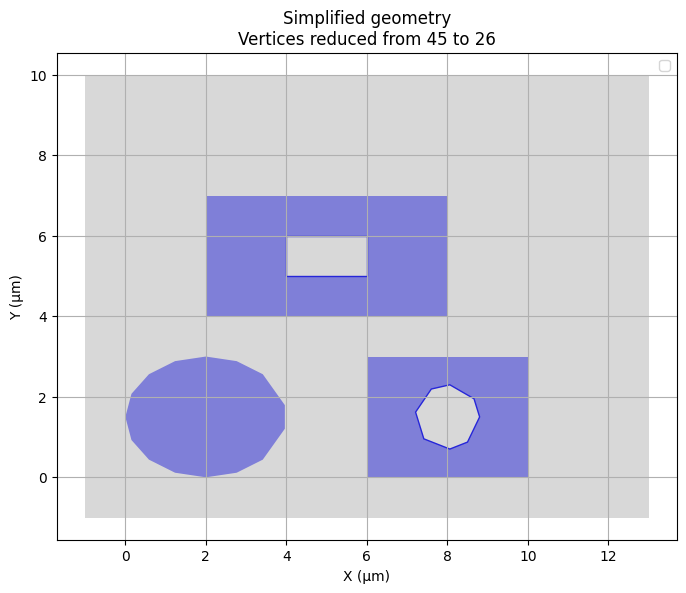
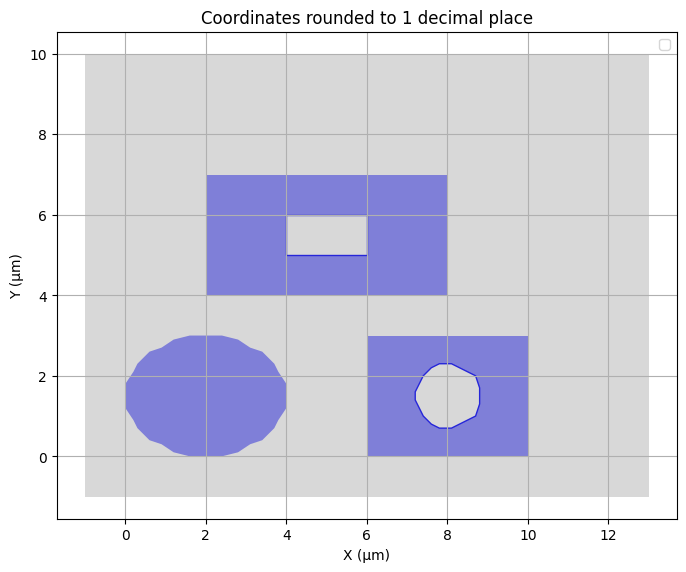
Defeaturing of polygons by simplification and vertex snapping can help make complicated shapes less complicated, and hence less costly, in large meshes:
original_vertices = sum(len(poly.exterior.coords) for poly in geom1.geoms)
simplified = geom1.simplify(0.1)
simplified_vertices = sum(len(poly.exterior.coords) for poly in simplified.geoms)

plot_geometry(
    simplified,
    f"Simplified geometry\nVertices reduced from {original_vertices} to {simplified_vertices}",
)
# Round coordinates to 1 decimal place
rounded = shapely.set_precision(geom1, 0.1)
plot_geometry(rounded, "Coordinates rounded to 1 decimal place")
/tmp/ipykernel_2806/2754610462.py:45: UserWarning: No artists with labels found to put in legend.  Note that artists whose label start with an underscore are ignored when legend() is called with no argument.
  plt.legend()
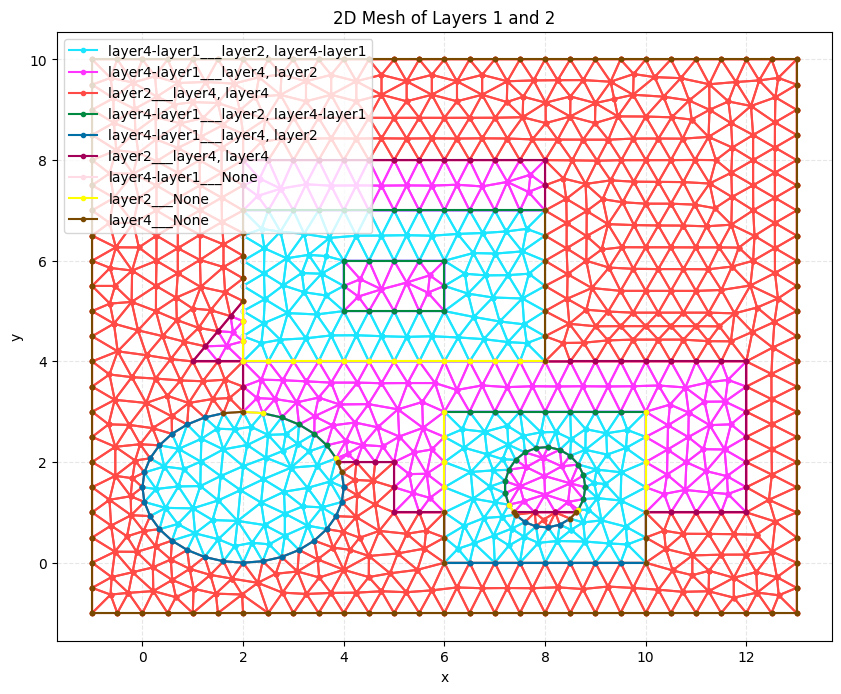
The resulting MultiPolygons can of course be directly used in Prisms and PolySurfaces for meshing:
# Create PolySurface for Layer 1
layer1_surface = PolySurface(
    polygons=gds_as_shapely_dict[(1, 0)],
    physical_name="layer4-layer1",
    mesh_order=1,
)

# Create PolySurface for Layer 2
layer2_surface = PolySurface(
    polygons=gds_as_shapely_dict[(2, 0)],
    physical_name="layer2",
    mesh_order=2,
)

# Create PolySurface for Layer 4
layer3_surface = PolySurface(
    polygons=gds_as_shapely_dict[(4, 0)],
    physical_name="layer4",
    mesh_order=3,
)

write_xao(cad_occ([layer1_surface, layer2_surface, layer3_surface]), "2d_mesh.xao")

output_mesh = mesh(
    dim=2,
    input_file="2d_mesh.xao",
    output_file="2d_mesh.msh",
    default_characteristic_length=0.5,
)


# Visualize the mesh
plot2D(output_mesh, wireframe=True, title="2D Mesh of Layers 1 and 2")
Info    : Clearing all models and views...
Info    : Done clearing all models and views
Info    : Reading '2d_mesh.xao'...
Info    : Snapping geometry point 68 to curve (distance = 1e-05)
Info    : Snapping geometry point 68 to curve (distance = 2e-05)
Info    : Snapping geometry point 70 to curve (distance = 5.0138e-06)
Info    : Snapping geometry point 70 to curve (distance = 1.00276e-05)
Info    : Done reading '2d_mesh.xao'